127,326,654 files
4,6 Trustpilot
since 2013

HEIC to JPG

Convert online and free HEIC to JPG

Uploaded filetype:
Choose filetype:

Converting in only three steps

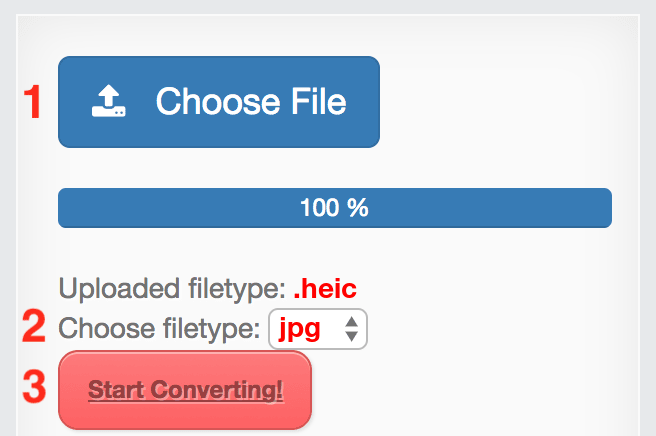
  1. Upload file
  2. Choose target filetype
  3. Download file!
convert .heic to .jpg
We respect your privacy! Your connection is 256 bit encrypted.
Privacy policy
Add bookmark for File-Converter-online.com
Advert:
4.6/5(6 votes)

The .heic file format is used for images. The compression for HEIC files is much more efficient than for jpg images – the file size is therefore smaller. However, not all devices and browsers support the display of HEIC files without installing additional software.

Convert HEIC to JPG online

Converting HEIC to JPG is very easy online. Simply select your HEIC file with the "Choose file" button. As soon as the upload is complete, you can start the conversion with the "Start conversion" button. On the download page, the download starts automatically after a few seconds.

Where do the HEIC files come from?

Smartphones and tablets from Apple have been using the HEIC file format to save photos since iOS 11. The better compression of the pictures makes better use of the storage space and more photos can remain on the device. However, if you want to share the photos, they can easily be converted to the more popular .jpg format online.

4.6/5(6 votes)

Guide: Convert HEIC to JPG online

How to convert HEIC files online to JPG
  1. Choose input HEIC file
  2. Check target filetype and change if required (JPG)
  3. Hit the "Start Converting!" Button
  4. That's it! Your download will start automatically on the following page

Currently we support the following conversions with HEIC files:

All Converters

Information about the extensions for the conversion from HEIC to JPG

From: HEIC

The HEIF file format is a file format for images published in 2000. The abbreviation stands heif ile format for H igh e fficiency I mage F - so a highly efficient file format for images. In Windows 10, .HEIC or .HEIF files can be edited with Paint, u …

File extension: .heic
More information and converters for HEIC

To: JPG

The jpg, or JPEG, file format is used for images. It is often used for digital photos, and for images displayed on the internet. It is a common format that can be opened by most computers, tablets, mobile phones, and other devices. Saving an image …

File extension: .jpg
More information and converters for JPG

Frequently asked Questions

HEIC files are images that are highly compressed. Similar to JPEG, HEIC is a way of saving high-resolution images in small files. While JPEG, for example, is a rather older and established standard, the HEIC format, based on the H.265 video standard, is a highly modern and efficient file format for photos.
It's simple: the cameras in smartphones have become better and better over the years and are achieving ever higher resolutions. This also increases the file size of the images. Apple introduced the HEIC format for devices from the iPhone 7 onwards back in 2017 so that the entire storage space is not used up after just a few high-resolution images. The main argument: less memory requirement with very good quality at the same time.
With file-converter-online.com you can convert HEIC images easily and without registration in your browser. Simply upload your HEIC image. If desired, you can change the target format, the default is JPEG. As soon as the upload is complete, click on "Convert". The download will start automatically after the conversion (this only takes a few seconds).
The most important disadvantage is probably the higher memory consumption. Experience has shown that the converted JPEG image will be about twice to three times the size of the HEIC file, with approximately the same quality.
Yes, the conversion is of course carried out without watermarks or other loss of quality. Up to three files per hour can be converted free of charge and without registration; in the premium version you can convert up to 50 files simultaneously.
After conversion, your images are deleted fully automatically after 3 hours at the latest. Your data is processed in a computer centre in Germany and is of course not shared with anyone.

Video-Tutorial: HEIC to JPG

File-Converter-Online.com is a service for converting files online from one type to another. We take care of your privacy and take care of your files. As a part of this, there's no registration required on file-converter-online.com. As we're offering our service in a browser, it does'nt matter whether you use Windows, Apple OS X or Linux. Your conversion results will always be at the same, very high quality and of course, without watermarks.

No Comments

Leave a Reply

Your email address will not be published. Required fields are marked *